How Eye Tracking AI Improves UX Research Without Relying Only on Surveys
Ask a user how easy your website was to navigate, and most will give you a polite, general answer “it was fine,” or “I found what I needed.” That answer often hides the ten seconds they spent scanning the page for a menu that should have taken two. This is the core limitation of survey-based UX research: it captures how people felt about an experience, not what actually happened while they moved through it. Eye tracking AI fills that gap, giving UX teams a direct, behavioral record of attention, hesitation, and friction that self-reported feedback consistently misses.
The Gap Between Stated Usability and Actual Behavior
Usability surveys and post-task interviews are valuable for capturing sentiment, but they depend on a user’s ability to notice and accurately recall their own struggle points something people are often bad at, especially for small, momentary frustrations that resolve themselves within seconds. A user might click around a page for a while before finding a CTA, then rate the experience as “easy” simply because they eventually succeeded.
Eye tracking AI removes this dependency on memory and self-assessment. It records, in real time, where attention went, how long it lingered in any one area, and where it moved next an objective trace of behavior that exists independently of what the user later says about it.
This matters especially for the small, momentary friction points that shape overall perception without ever rising to the level of a complaint. A user who briefly hunts for a checkout button, then finds it and completes the purchase, will often rate the experience positively overall the frustration was real but fleeting, and easily forgotten by the time a survey asks about it. Eye tracking data preserves that moment even when the user’s own memory doesn’t.
This article is part of a broader series for the full picture of how eye tracking AI works across market research, see the complete guide to eye tracking AI in market research.
What Eye Tracking AI Adds to a UX Study
In a typical UX research session, eye tracking AI layers several behavioral signals on top of standard usability testing:
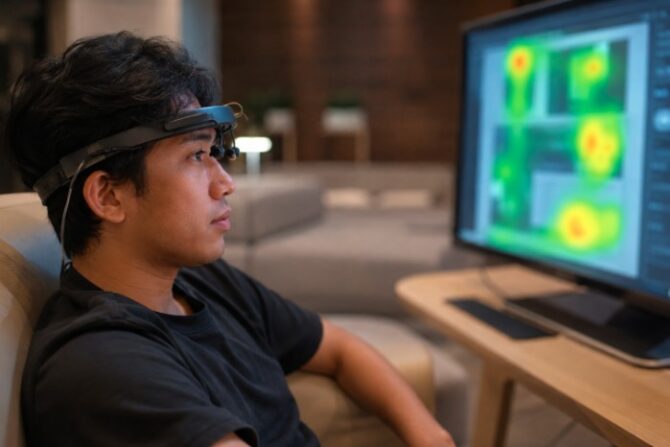
- Attention heatmaps showing which page or screen elements get the most visual focus
- Scan paths revealing the actual order users move through a layout
- Time to first fixation on key elements like a primary CTA or navigation item
- Areas of missed attention elements that exist but are consistently skipped
- Comparative attention across design variants, useful for A/B usability testing
Together, these metrics answer the question surveys can’t: not “did the design feel intuitive,” but “did the user’s eyes actually find what they were looking for, and how quickly.”
Where This Matters Most in UX Research
Eye tracking AI tends to add the clearest value in a few recurring UX research scenarios:
Navigation and information architecture confirming whether users’ gaze finds the intended menu or search path quickly, or wanders looking for it.
Above-the-fold prioritization showing what actually gets seen before a user scrolls, which is critical for landing pages and product pages where the first few seconds of attention often determine engagement.
CTA and conversion element placement verifying that primary calls to action receive meaningful visual attention, not just technical visibility.
Comparative design testing running two or more layout variants through eye tracking to see, objectively, which one earns faster, clearer attention to key elements.
These use cases are core to UX testing workflows, and they extend naturally into customer journey testing, where attention data is tracked across multiple steps of a broader digital experience rather than a single screen.
Combining Eye Tracking With Other UX Signals
Attention data is strongest when it’s not used in isolation. Pairing eye tracking with think-aloud protocols, task-completion metrics, and even emotion AI gives UX researchers a fuller diagnostic picture not just where users looked, but how they felt at the moment of hesitation or success. A user might glance at a confusing element repeatedly (visible in gaze data) while their facial expression shows visible frustration, giving the research team a much clearer signal than either data point alone.
What Healthy vs. Problematic Attention Patterns Look Like
Interpreting a UX eye tracking study comes down to recognizing a few recurring signatures in the data.
A healthy pattern usually shows attention moving efficiently toward the element a task requires a user looking for a search bar finds it within a fixation or two, without a prolonged scan across unrelated parts of the page. Primary CTAs receive a meaningful share of attention relative to their importance, and navigation elements are fixated on early rather than late in a session.
A problematic pattern often shows the opposite: a long, scattered scan path before landing on the needed element, repeated fixation on the same confusing area without resolution, or a CTA that technically sits above the fold but receives almost no attention because it’s visually similar to surrounding content. In some cases, gaze data shows users fixating on an element that looks interactive but isn’t, revealing a mismatch between visual design and actual functionality.
Reading these patterns against the specific task not just the page in isolation is what turns raw attention data into a genuinely useful usability finding rather than an interesting but disconnected visualization.
How an Eye Tracking AI UX Study Typically Runs
Adding eye tracking to a UX research plan generally follows a straightforward sequence:
- Task and prototype setup — the website, app, or prototype is prepared with the specific tasks or screens the study needs to evaluate.
- Participant recruitment — users matching the target profile are recruited, often through a research panel, to complete the tasks under natural conditions.
- Webcam-based gaze capture — attention is recorded as participants navigate the interface, alongside standard usability metrics like task completion and time on task.
- Aggregation into heatmaps and scan paths — individual sessions are combined to reveal patterns that hold across the sample, not just one user’s experience.
- Synthesis against UX objectives — findings are interpreted against specific design questions, such as whether a redesigned navigation reduces the time to first fixation on a key menu item.
Because this runs remotely through a standard webcam, it fits naturally into existing remote usability testing workflows rather than requiring a separate in-person lab session.
Common Mistakes When Interpreting UX Attention Data
Assuming longer dwell time always means a problem. A longer fixation can indicate confusion, but it can equally indicate genuine interest or careful reading attention data needs to be interpreted alongside task outcomes and, ideally, emotional signals, not read as inherently negative.
Testing with too small a sample to see a real pattern. A single user’s scan path is anecdotal; usability findings become reliable once patterns are consistent across a reasonably sized group of participants.
Only measuring attention on the elements the team expects users to look at. Some of the most valuable UX findings come from noticing where attention goes that the team didn’t anticipate an unrelated visual element pulling focus away from the intended task path.
Why This Doesn’t Replace Surveys It Strengthens Them
None of this means surveys and interviews lose their place in UX research. Stated preference, satisfaction scores, and qualitative feedback still capture things eye tracking can’t a user’s reasoning, their emotional framing of the experience, and their explicit suggestions. Eye tracking AI’s role is to supply the behavioral evidence that either confirms or challenges what users report, so UX teams aren’t making design decisions based on stated opinion alone.
Conclusion
UX research built only on what users say tends to miss what users actually do. Eye tracking AI restores that missing behavioral layer showing precisely where attention goes, where it gets stuck, and where it’s lost entirely giving product and design teams evidence to act on, not just opinion to interpret. Used consistently across design iterations, it turns usability research into an ongoing, measurable feedback loop rather than a one-off checkpoint before launch.
For product and design teams that have relied primarily on satisfaction scores and stakeholder opinion up to this point, adding eye tracking AI is often the single change that shifts UX research from a subjective discussion into a measurable, testable practice one where a redesign’s success can be verified against attention data in the next round of testing, rather than assumed.
To see this applied to your own website or app experience, request a demo of TheLightbulb.ai’s Insights Pro, or read the complete guide to eye tracking AI in market research.
Frequently Asked Questions
Can eye tracking AI be used for both websites and mobile apps?
Yes. It applies to any visual interface desktop websites, mobile apps, and prototypes wherever understanding where users actually look adds value to a usability study.
Does eye tracking AI replace usability testing methods like task analysis?
No, it complements them. Eye tracking adds a layer of visual attention data on top of existing usability methods rather than replacing task completion rates, think-aloud sessions, or satisfaction surveys.
How quickly can eye tracking AI identify a usability problem?
Attention heatmaps and scan-path data can often surface friction points like a missed CTA or ignored navigation element within a single testing round, without waiting for users to self-report the issue.
Is eye tracking AI reliable for small sample sizes in UX research?
It’s most reliable when aggregated across a reasonable sample, similar to other usability research methods, so patterns can be distinguished from individual variation.
Can eye tracking AI be combined with think-aloud usability testing?
Yes many teams run them together, using gaze data to verify or add detail to what a participant describes out loud, since the two methods often surface complementary rather than identical findings.
How quickly can UX teams act on eye tracking AI findings?
Because webcam-based studies can be fielded remotely and analyzed quickly, findings are often available fast enough to inform an active design sprint rather than only a longer-term research cycle.